
Portainer
Deploy AirTrail as a Portainer stack.
Portainer is a web interface for managing Docker. AirTrail runs in Portainer as a stack built from the standard Compose file.
In Portainer, open Stacks and click Add stack. Name it, for example, airtrail.
In the Web editor, paste the contents of compose.yml.
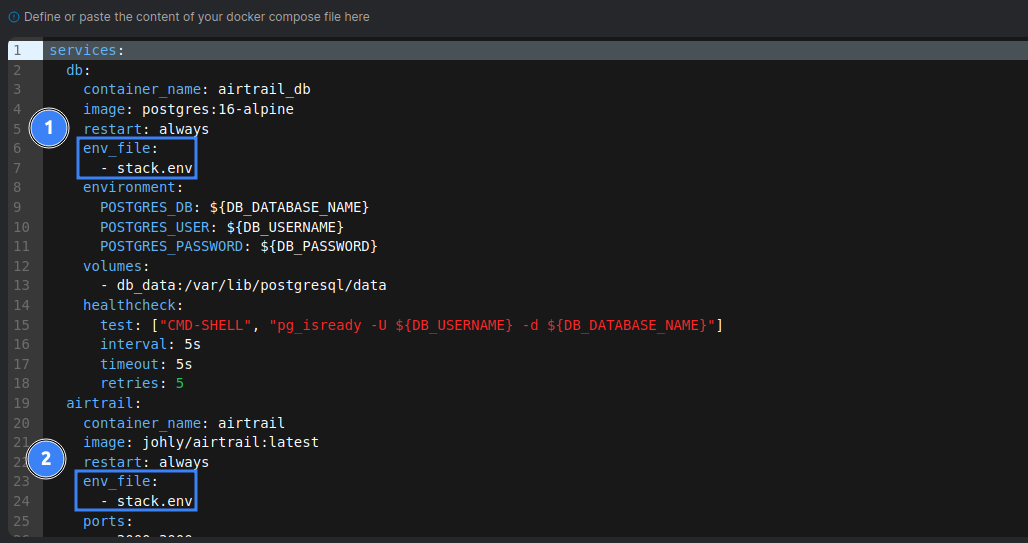
Replace both .env references under env_file with stack.env, which is how Portainer passes stack variables to containers:
Under Environment variables, switch to Advanced mode and paste the contents of .env.example. Then:
- Set
ORIGINto the exact URL you will open AirTrail at. - Change
DB_PASSWORDand the password insideDB_URLto the same random value (letters and digits only). - Behind a reverse proxy, add
ADDRESS_HEADER=X-Forwarded-For.
Click Deploy the stack, then follow the post-installation steps.
Uploads
The stack creates a named uploads volume that is already writable by the app. If you switch it to a bind mount on the host, the folder must be owned by UID and GID 1000. See Uploads and file permissions.
Updating
Open the stack, click Editor, then Update the stack with Re-pull image and redeploy enabled. Take a backup first.
Last updated on